> For the complete documentation index, see [llms.txt](https://docs.gitconnector.com/llms.txt). Markdown versions of documentation pages are available by appending `.md` to page URLs; this page is available as [Markdown](https://docs.gitconnector.com/master/getting-started/basic-configuration.md).
# Basic Configuration
**Settings** -> **Marketplace** **Apps** -> **GitHub integration for Jira**
Alternative configuration localizations
#### Company-managed spaces
[Manage your organization's Marketplace and third-party apps](https://support.atlassian.com/security-and-access-policies/docs/manage-your-users-third-party-apps/)
#### Team-managed spaces
[Manage Atlassian Marketplace apps in team-managed spaces](https://support.atlassian.com/jira-software-cloud/docs/manage-atlassian-marketplace-apps-in-team-managed-projects/)
{% stepper %}
{% step %}
#### **Connect your GitHub account**
Use [GitHub OAuth](/master/github-oauth.md) or [Personal Access Token (PAT)](/master/using-personal-access-tokens.md)
{% hint style="info" %}
Each connected GitHub account is scoped to an individual Jira administrator and is **not shared** across users. **Jira users must connect their own accounts.**
{% endhint %}
{% endstep %}
{% step %}
#### Set Up Repository Access
{% hint style="success" %}
**Option 1: Users inherit all repository access from their GitHub account**
Per-project repository mapping is **not required**. Jira users can see the repositories they have access to in GitHub. You can still set [Default Repositories](/master/default-repositories.md)**,** if you do so, users will see the preselected repositories on the work item, but they can change them freely.
{% endhint %}
{% hint style="danger" %}
**Option 2: Users inherit GitHub repository access for selected repositories only**
Per-project repository mapping **is required**. Jira users can see the repositories they have access to in GitHub, but the list is additionally filtered by [Default Repositories](/master/default-repositories.md)**,** if you do not set that mapping, users will not see anything.
{% endhint %}
{% endstep %}
{% endstepper %}
Optional Steps
### How to Hide the Default Development Panel in Jira Work Items
*Disabling unused development features helps reduce noise.*
[How To Remove or Edit Access to Development Panel from Jira Work Items](https://support.atlassian.com/jira/kb/how-to-remove-or-edit-access-to-development-panel-from-jira-issues/)
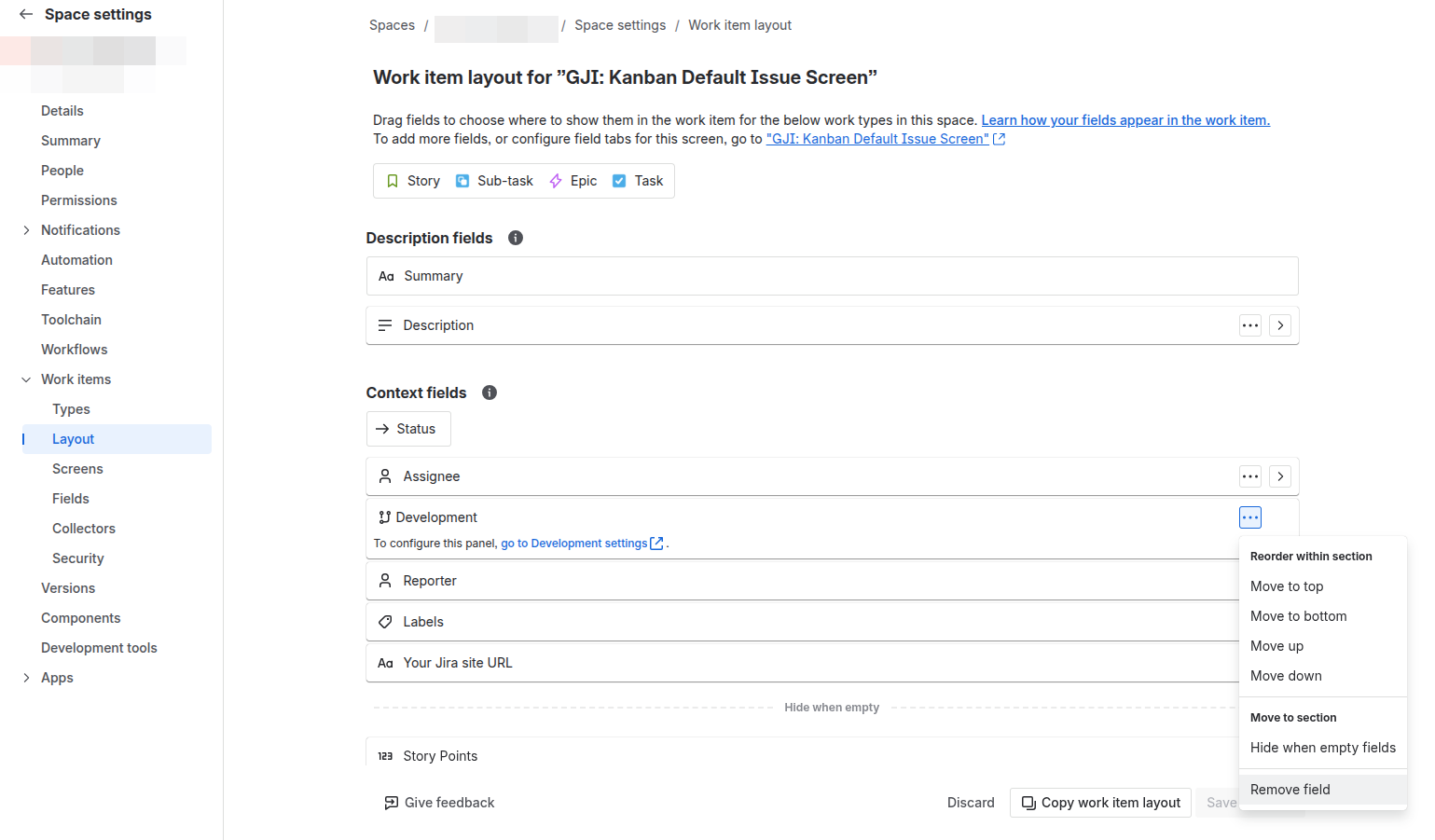
### 1. Remove the Development Field from Layout
This removes the panel from the issue UI.
**Steps:**
1. Go to **Project Settings → Work Items → Layout**
2. Find the **“Development”** field
3. Remove it from the layout
### 2. Remove “View Development Tools” Permission
This ensures users cannot see development data even if the field exists.
**Steps:**
1. Go to **Jira Settings → Work Items → Permission Schemes**
2. Open your permission scheme
3. Locate **“View Development Tools”**
4. Click **Remove**
5. Remove all groups, roles, or users
### 3. Disconnect Unused Git Integrations
Even with permissions removed, integrations may still attach some data.
{% content-ref url="/pages/KvKmZCkqPh4U5dONZdau" %}
[Branch Templates](/master/features/branch-templates.md)
{% endcontent-ref %}
{% content-ref url="/pages/RPHfDhO8pA6RHRmW49kM" %}
[Space Configuration (Project Configuration)](/master/features/project-configuration.md)
{% endcontent-ref %}
{% content-ref url="/pages/I7RlYOoiqbYk69CJS9rx" %}
[Global Configuration](/master/features/global-configuration.md)
{% endcontent-ref %}